
The CorrCoach Team

TrainingPeaks or CorrCoach? What you keep and what you lose.

TrainingPeaks is a calendar and analysis platform that a lot of coaches run on. CorrCoach is narrower: it builds your plan for you. This page is for someone deciding whether to move, with prices, what carries over and what does not.

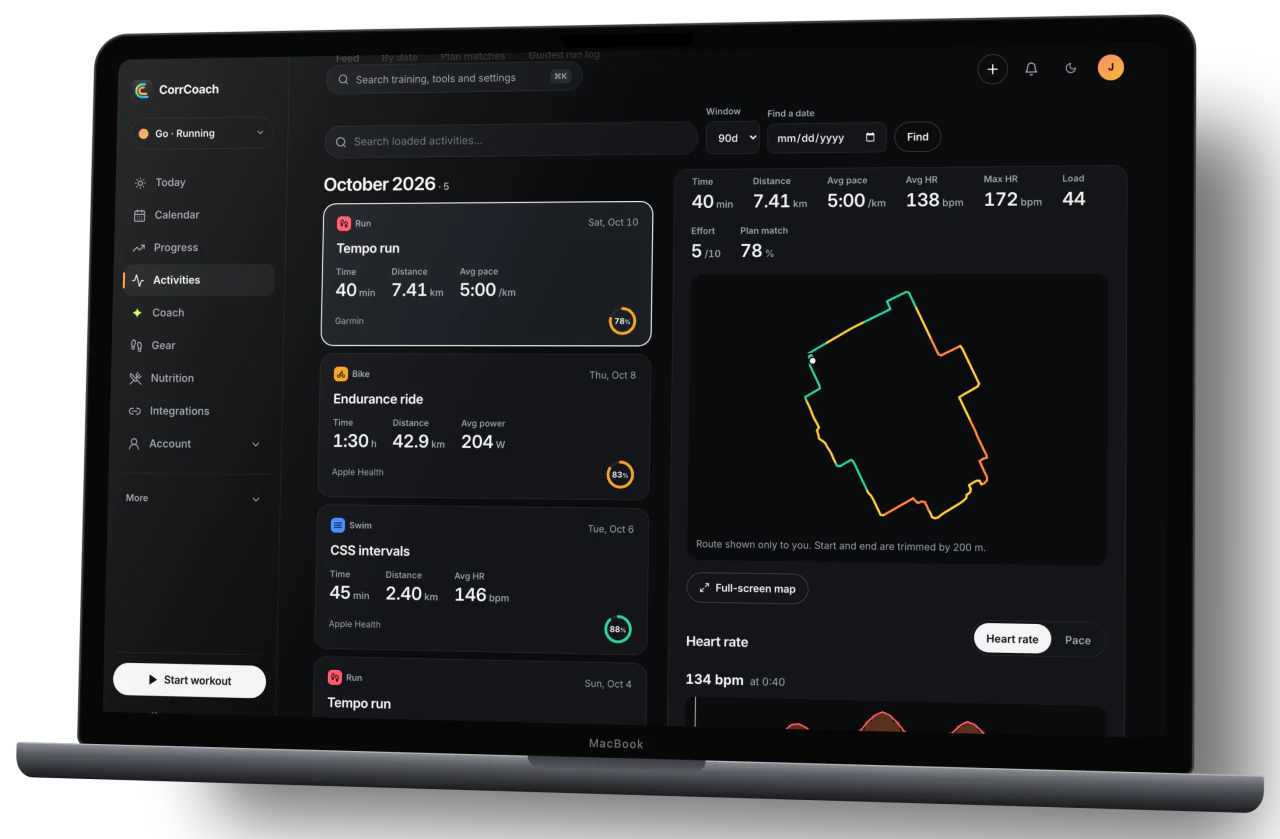
A completed tempo run on a MacBook: time, distance, pace, heart rate, plan match and its route along real streets, for a made-up athlete.
Real CorrCoach screens with a made-up athlete’s data: a completed run with its plan match.
Athlete reviewing a training app on a phone beside an indoor track.

A calendar becomes more useful when it explains the next choice.

CorrCoach is designed to keep generated planning, device execution, and completed-work review close together for athletes who want fewer manual calendar decisions.

  • Generated planning rather than calendar storage alone
  • Web, iPhone, Watch and workout receipts

Who each one suits.

We are not claiming TrainingPeaks lacks features or performs worse. This page describes CorrCoach for athletes comparing a narrower workflow built on generated plans.

Who TrainingPeaks suits

TrainingPeaks suits athletes who have a coach and athletes who like to write their own plan and read the numbers. It is a calendar, a workout builder and a set of analysis charts, and many coaches run their business on it. It reads a long list of file types from devices, including FIT, TCX, GPX and ZWO.

If your coach is on TrainingPeaks, stay. A coach who knows you is worth more than any app, and moving would mean asking them to change tools.

Who CorrCoach suits

CorrCoach suits athletes who coach themselves and want the plan built for them from their race date, the hours they have and what they did last week, with each change explained and waiting for their OK. It works best on iPhone and Apple Watch.

It does not replace a coach. Coach and team workspaces are in beta, with seats by request, and today CorrCoach is built first for the athlete.

What each costs, as of October 2026

TrainingPeaks lists one athlete subscription, Premium, plus coaching tiers. CorrCoach has a free plan and two paid ones. On the price list, TrainingPeaks Premium is the cheaper of the two paid options by about $65 a year.

TrainingPeaks and CorrCoach compared, as of October 2026
What you pay forTrainingPeaksCorrCoach
MonthlyPremium $19.95 a monthCore $20 a month on the web, $25 a month through the App Store
AnnualPremium $134.99 a yearCore $200 a year on the web. The App Store is monthly only
Higher tierCoaching tiers (Bronze, Silver, Gold) are listed on its athlete pricing pagePro $50 a month or $500 a year on the web, $60 a month through the App Store
FreeNo free athlete plan on its athlete pricing pageA free plan: 14-day AI plan window, one AI plan credit a month, a web view of your plan and history
Who writes the planYou or your coachCorrCoach generates it from your week. You approve the changes

Prices are the public US-dollar prices on each vendor’s own page, read on 30 October 2026. They change, so check the linked page before you buy. CorrCoach publishes this page and makes one of the two products, so read it with that in mind.

What you keep and what you lose.

Most of what makes a training history valuable is the activities themselves, and those can move. The analysis built on top of them cannot.

You keep

  • Your activity history: workout files and Apple Health workouts come across by import. Files you export from Strava or your watch account work too.
  • Your devices: Apple Watch runs the plan, planned workouts export as FIT and planned rides export to Zwift as .zwo.
  • Your calendar’s shape: you enter your race date and weekly hours once and the plan is built from them.

You lose

  • A coach on the same platform. CorrCoach has no coach marketplace, and its coach and team workspaces are in beta, with seats by request.
  • TrainingPeaks’ analysis history. Its calculated training stress, fitness charts, notes and comments do not come across. CorrCoach reads activity files and builds its own progress charts from the workouts it holds.
  • The wider ecosystem of third-party plans and tools that grew up around TrainingPeaks, and its export to formats such as .ERG and .MRC. CorrCoach exports FIT and .zwo.
  • Watch workouts on anything but Apple Watch. A Garmin or Wahoo device can load a planned workout by FIT file.

How to bring your history across.

You are moving workouts, not a database. Start with the files, then connect what stays current.

  1. In TrainingPeaks, open Settings and Data Export, pick a period of 12 months or less and export. You get a folder of your workout files, and you can export a summary CSV too. Repeat for earlier years if you want them.
  2. To rescue one workout, open it, choose Files and download it. The file keeps the format it was uploaded in, so a .fit file comes back as .fit.
  3. In CorrCoach, import the FIT, TCX and GPX files on the web. Each file can be up to 10 MB.
  4. For recent training on iPhone, share your workouts to Apple Health and let the CorrCoach app read them, and new activities arrive without files. Garmin is coming soon: we’ve asked Garmin for access to their API and are waiting on them. Until then, Garmin workouts reach CorrCoach through Apple Health or as FIT files.
  5. Enter your race date and weekly hours. CorrCoach builds the next weeks from the history it now holds.

What CorrCoach imports

  • FIT, TCX and GPX activity files
  • Apple Health workouts and readiness data, on iPhone

What does not come across: planned workouts, notes, comments and TrainingPeaks’ own calculated metrics. Your charts in CorrCoach start from the imported activities, not from your TrainingPeaks history.

Honest limits.

  • CorrCoach costs more than TrainingPeaks Premium on the annual price list: Core is $200 a year, Premium is $134.99.
  • There is no Android app. Watch workouts need an Apple Watch.
  • AI plans run on credits: one a month on the free plan, 9 on Core, 25 on Pro. A failed or rejected generation keeps your current plan and charges nothing.
  • CorrCoach is a newer product with a smaller set of integrations. If your workflow depends on a specific tool that is not in its list, test that first.

Sources you can check.

Published by The CorrCoach Team. Updated . Screens are real CorrCoach captures of a made-up athlete, not customer training data.

Questions.

Can I import my TrainingPeaks history into CorrCoach?

Your workouts, yes. Export them from TrainingPeaks Data Export, up to 12 months at a time, and import the FIT, TCX or GPX files into CorrCoach. TrainingPeaks’ calculated metrics, notes and planned workouts do not come across.

Is CorrCoach cheaper than TrainingPeaks?

Not on the price lists. Premium is $134.99 a year and CorrCoach Core is $200 a year on the web. CorrCoach has a free plan, and TrainingPeaks does not list a free athlete plan.

Can my TrainingPeaks coach use CorrCoach?

Coach and team workspaces are in beta, with seats by request. Today CorrCoach is built first for athletes. If your coach works in TrainingPeaks, staying put is the simplest choice.